Free Printable Food Allergy Card
(No Sign-Up Required)
Build a bilingual allergy card in under a minute, then print it straight from your browser or download the image to print anywhere. No account, no shipping, no per-language fee.
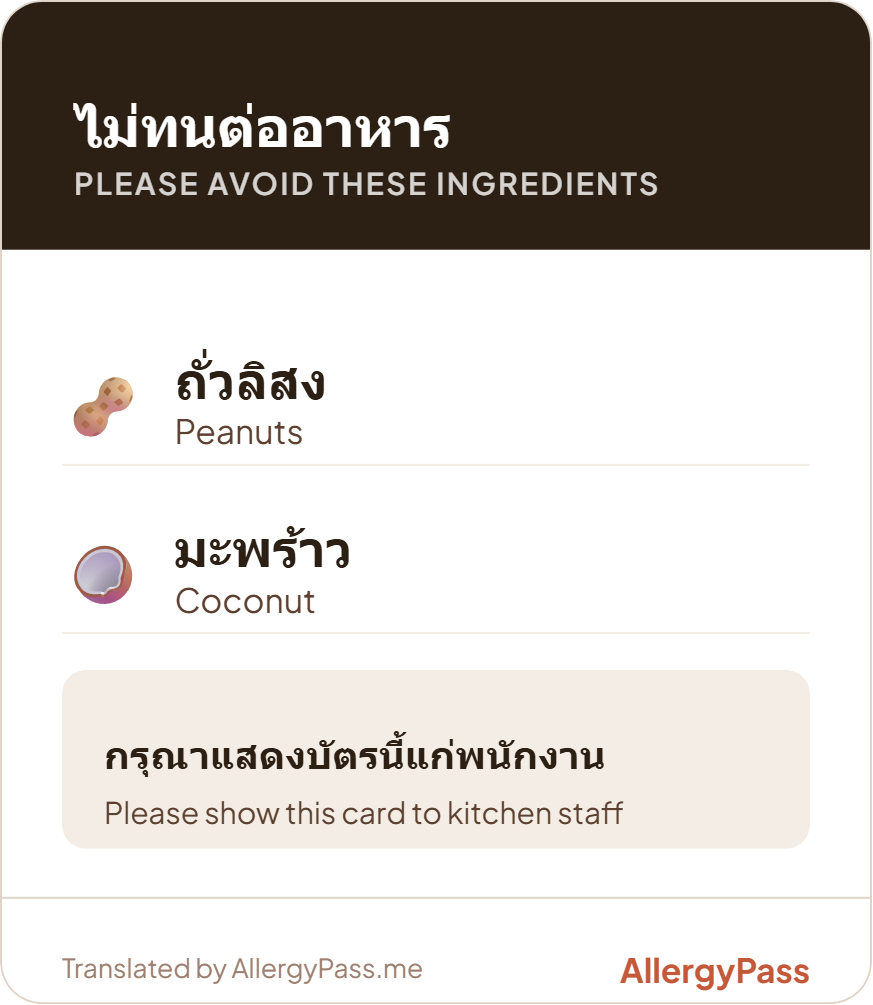
Why a printable card is worth carrying
A digital card on your phone works right up until the phone doesn't: dead battery, no signal, or a screen that's hard to read in bright sun at an outdoor stall. A paper card handed straight to a server or cook doesn't have any of those problems, and it's often faster than unlocking a phone and finding the right screen.
This isn't an argument against the digital version. Most travelers carry both: the wallet pass or saved image as the everyday option, and a printed, laminated card as the backup that keeps working no matter what happens to the phone that day.
How to make your printable card
- Open the Card Builder and pick your destination language.
- Select your allergens and severity. The card preview updates as you go, so you can check the wording before you print.
- Download the image or print it. No account is required for the free tier.
Two ways to print your card
Download and print. Use the Download Image button on the builder to save a PNG, then print it at home or at any print shop or convenience store. Standard printer paper works fine. Most people trim it down to roughly postcard or receipt size and laminate it, or slip it into a cheap plastic sleeve, so it holds up over a full trip.
Print straight from the builder. You can also skip the download step entirely. With your card showing in the builder, use your browser's print command (Ctrl+P on Windows, Cmd+P on Mac). The page hides the form, navigation, and everything else, and prints only the card on its own sheet.
What to check before you travel
- Destination language. The free tier covers Thai and English only. The other 38 live languages need a Single Trip Pass for one destination or an All Access plan for every language.
- Allergen list. Every tier allows unlimited allergens, so add everything relevant rather than leaving anything off to save space.
- A digital backup. On paid tiers, saving the image to your phone or adding it to Apple/Google Wallet gives you a second option for the moments the paper card isn't on hand.
Build your free printable card now, no sign-up required
Build My CardFrequently asked questions
Is the printable allergy card really free?
Yes. The Free Starter tier covers Thai and English destinations with unlimited allergens and no sign-up. You can download the card as an image and print it as many times as you want at no cost.
What size should I print my allergy card at?
There's no fixed print size. Most people print on standard letter or A4 paper and trim the card down to roughly postcard or receipt size, then laminate it or slip it into a plastic sleeve so it survives a full trip.
Can I print directly from the card builder instead of downloading an image first?
Yes. With your card open in the builder, use your browser's print command. The page's print layout hides the form and navigation and shows only the card, so it comes out clean on its own sheet without any extra steps.
Which destinations are included in the free printable card?
The free tier covers Thai and English. The other 38 live destination languages require a Single Trip Pass for one destination or an All Access plan for every language.
Do I need to create an account to print a card?
No. The free tier and Single Trip Pass both work without creating an account. You pick your destination and allergens, preview the card, and print or download it directly.
Key takeaways
- The Free Starter tier builds a printable Thai/English card with unlimited allergens and no sign-up.
- You can download the card as a PNG image, or print it directly from the builder using your browser's print command.
- Laminating your printed card, or printing a spare copy, keeps a backup around after a damaged or lost card.
- Other destination languages need a Single Trip Pass ($4.99, one destination) or an All Access plan (all 40 live languages).
- A printed card doesn't replace medical advice. Review the wording with a healthcare professional if you're unsure about anything on it.
Build a bilingual allergy card for your destination in native script. Select your allergens, set severity, and print it or export as an image or wallet pass. No sign-up required for the free tier.
Build my card →This article is for informational and travel preparation purposes only and does not constitute medical advice. Always consult a qualified healthcare professional before traveling with a food allergy, and carry any prescribed emergency medication at all times. See our full medical disclaimer.