 AllergyPass
From your restrictions
to a card the kitchen can read
Choose what you need to avoid, where you are going and, if helpful, the language you read. AllergyPass builds the card in the destination language and English, then emails the formats included with your plan so you can save them before the restaurant.
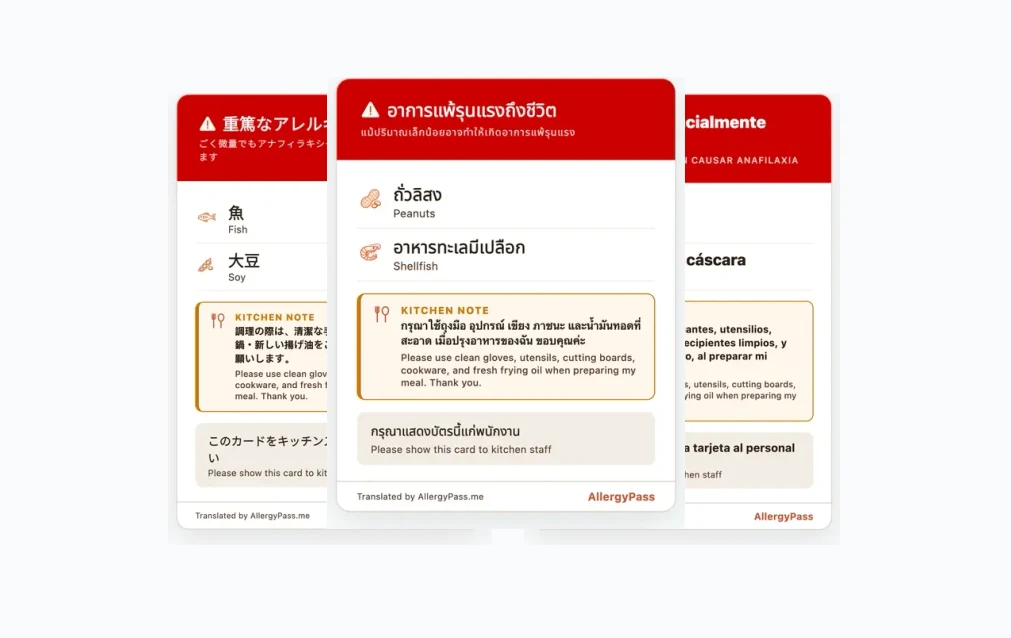
Step 1: describe what the kitchen needs to know
Start in the Card Builder and choose your destination. Then select every allergen, intolerance, dietary requirement or other restriction that applies. There is no limit on the full image or printable card. Turn on the severe or anaphylactic warning when it accurately describes your risk, and add the cross-contact note when the kitchen needs that instruction.
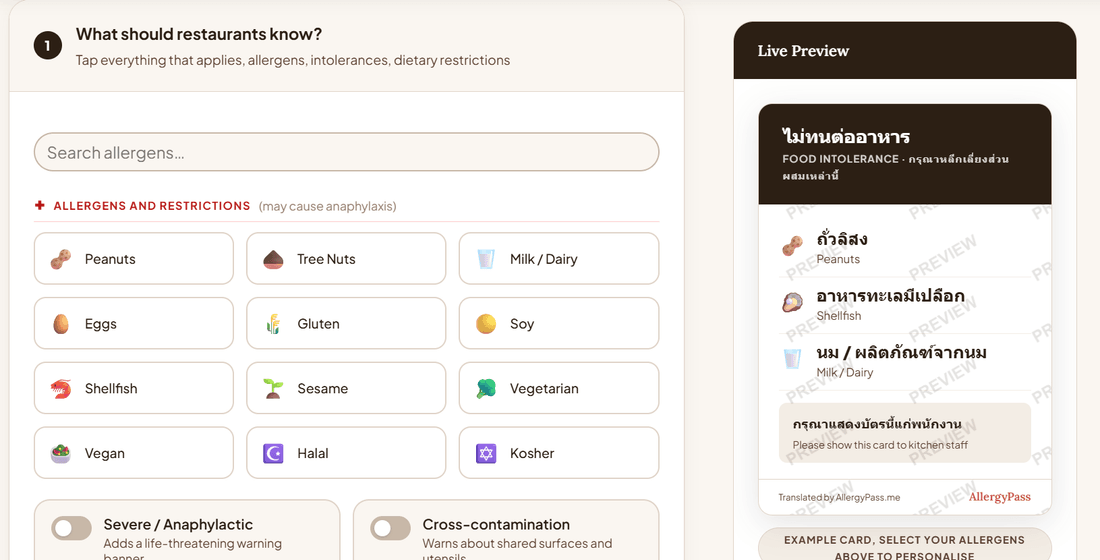
Choose the languages on the card
A paid destination card includes the language used at your destination and English. The optional My language picker adds the language you read when it differs from those two. For example, a French-speaking traveler going to Thailand can make one card in Thai, English and French. The preview and printable PDF identify the languages included.
Step 2: choose the plan that matches your trip
All three plans allow unlimited restrictions. The difference is where the card can be used and which formats are delivered. Prices are one-time purchases; there are no renewals.
| Plan | Coverage | What you receive |
|---|---|---|
| Free Starter $0 | English destination card | Card image by email |
| One Language $7.99 once | One destination language | Card image and printable PDF by email; Apple and Google Wallet links when the card has up to three restrictions |
| All Languages $29.99 once | Every available language, including languages added later | All card exports, unlimited Allergy Risk Checker use and future premium tools |
The builder shows the exact package before checkout. One Language remains tied to the purchased destination. All Languages is permanent and can be used again for other destinations.
Step 3: receive and check your card files
Enter your email in the free form or secure checkout. Free Starter sends one image email. A paid card is delivered in two messages so either format can be retried independently: one contains the card image and any eligible Wallet links, and the other contains the printable PDF attachment. There is no account to create and no permanent download page, so keep the messages until you have saved the files you need.
The card image. This is the complete, high-resolution card for your phone. Save it to Photos or your gallery before traveling so it remains available without a signal.
Wallet links. Paid cards with up to three restrictions include Apple and Google Wallet links. The Wallet format has less room than the full card, so it is unavailable when the list is longer.
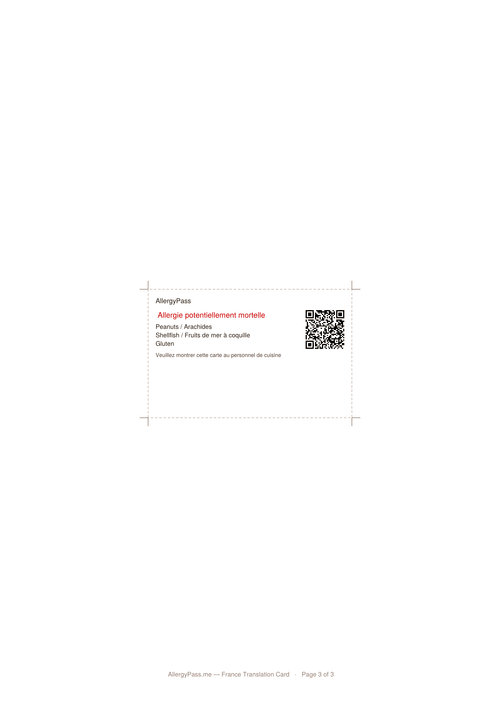
The printable PDF. Every paid card includes a white-background, print-ready PDF. It keeps the complete card, cutting guide, use instructions and safety reminder together on one page. It also names every language on a multilingual card. The layout expands as the restriction list grows; with more than two restrictions, the card cannot remain credit-card size while keeping the text readable. Exceptionally long lists may require the larger paper size stated on the PDF.
Optional destination resources. Some emails may include a short list of planning resources such as travel insurance, an eSIM, or ground transport. These are optional and separate from the card's allergy communication.
Step 4: save a phone copy and a paper backup
Open both paid-delivery messages before the trip. Save the image offline, add the Wallet pass when eligible, and print the PDF at 100% or actual size using the paper size named on the page. Turn off “fit to page” or “shrink to fit,” then cut along the dashed line. Carry a spare printed copy in a different bag.
At the restaurant, show the card while ordering and ask that it reaches the kitchen. Give staff time to read it. The card supports the conversation; it cannot confirm recipes, preparation methods or cross-contact controls. Carry prescribed medication and treat an uncertain answer as a no.
Ready to see your own card? Build one now; no account is needed, but an email is required to receive it.
Build My CardSee our printable allergy card guide for more detail about carrying paper versus showing your phone, or read whether translation cards actually work to understand why the wording on the card matters.
Frequently asked questions
How many allergens can I add to my wallet pass?
Where a wallet pass is included, it displays up to three allergens. That is a limit of the wallet format, not the full card. If your list is longer, use the emailed image or the printable PDF for the complete list.
Which languages appear on my AllergyPass card?
A destination card includes the destination language and English. You can also choose the language you read, giving you a three-language card when that language differs from both. The printable PDF names every included language at the top.
Will my printable card fit on one page and at credit-card size?
The printable PDF keeps the complete card and its instructions together on one page. A card with more than two allergens or restrictions cannot remain credit-card size while keeping the text readable, so the layout expands and the PDF identifies the paper size to use.
Do I need an account or a smartphone to use the card?
No account is required, but you do need an email address to receive the card. Save the image or wallet pass before you travel, and carry the printed version if you want a format that does not depend on a phone, battery, or signal.
What if I change my allergens after I've already bought my card?
If your One Language pass or All Languages plan covers that destination, you can rebuild the card with the updated restriction list and use Send my card emails to request a fresh image and printable PDF. Wallet links are included when the card has no more than three restrictions.
What are the destination recommendations in my email?
Some card emails may include a short list of destination-related resources, such as travel insurance, an eSIM, or ground transport. It is optional planning information, not part of the allergy card or medical guidance.
This article is for informational and travel preparation purposes only. It does not constitute medical advice. Always consult a qualified healthcare professional before traveling with a food allergy, and carry any prescribed emergency medication at all times. See our full medical disclaimer.